Kajabi Vs. Teachable: A Side-By-Side Comparison for Ultimate Success
Choosing the right platform for your online courses can feel overwhelming. You want a tool that fits your needs, saves you time, and helps you grow your business.
That’s why comparing Kajabi and Teachable is so important. In this side-by-side comparison, you’ll discover which platform matches your goals, budget, and style. By the end, you’ll have a clear answer to help you make the best choice for your success.
Keep reading to find out which one truly stands out for you.
Credit: mirasee.com
Platform Overview
Choosing the right platform is important for online course creators. Both Kajabi and Teachable offer tools to build and sell courses. They help with content delivery, marketing, and managing students. Understanding their features helps in picking the best fit for your needs.
Kajabi Features
Kajabi is an all-in-one platform for course creation and marketing. It includes website building tools with customizable templates. You can create email campaigns to reach your audience directly. The platform supports membership sites and digital products. It has automation features to save time on tasks. Kajabi also offers detailed analytics to track sales and user activity.
Teachable Features
Teachable focuses mainly on course creation and sales. It allows easy uploading of videos, quizzes, and assignments. You can set up coupons and promotions to attract students. The platform supports multiple payment options and currencies. It offers a simple website builder with basic customization. Teachable includes basic email marketing tools and sales reports.
Credit: todaytesting.com
Course Creation Tools
Course creation tools are essential for building and managing online classes. They help organize lessons, upload materials, and shape the learning experience. Both Kajabi and Teachable offer strong tools but differ in features and ease of use.
Content Upload Options
Kajabi supports many file types like videos, PDFs, and audio files. You can upload content directly or link to external sources. It allows drip content, where lessons release over time. This keeps students engaged and paced well.
Teachable also accepts various file formats for lessons. It offers a simple drag-and-drop interface to add files fast. You can schedule content release and add quizzes to check progress. This makes course delivery smooth and interactive.
Customization Flexibility
Kajabi lets you customize course layouts and designs with ease. It includes templates and a visual editor for unique pages. You can change colors, fonts, and add branding elements. This helps create a professional and personal course feel.
Teachable provides basic customization with themes and layout choices. It is easy to use but less flexible than Kajabi. You can add your logo and adjust some colors. This suits creators who want quick setup without deep design work.
Marketing Capabilities
Marketing is a key part of online course platforms. Both Kajabi and Teachable offer tools to help you reach your audience. These tools support selling your courses and growing your business. Let’s explore their marketing features.
Email Marketing
Kajabi includes built-in email marketing tools. You can create email campaigns and send broadcasts easily. It also supports automation to send emails based on user actions. This helps keep your audience engaged without extra work.
Teachable does not have native email marketing tools. You must use third-party services like Mailchimp or ConvertKit. This means extra setup and sometimes added cost. But it also allows you to choose the email platform you prefer.
Sales Funnels
Kajabi offers a complete sales funnel builder. You can design landing pages, checkout pages, and upsell offers. Everything works smoothly inside one platform. This makes it easier to guide customers from interest to purchase.
Teachable has basic landing pages but no full funnel builder. You may need other tools like ClickFunnels to create funnels. This can complicate your marketing process and increase expenses.
Affiliate Programs
Kajabi has a built-in affiliate program feature. You can easily set up affiliates and track their sales. This helps grow your course sales with the help of partners.
Teachable also supports affiliate marketing. It provides simple tools to manage affiliates and commissions. Both platforms offer solid options for affiliate programs.
Pricing And Plans
Choosing the right platform depends a lot on price and what you get for it. Both Kajabi and Teachable offer different plans. These plans vary in cost and features. Understanding these differences helps you pick the best fit for your needs.
Cost Comparison
Kajabi’s pricing starts higher than Teachable’s. Kajabi plans begin around $149 per month. It offers three main tiers: Basic, Growth, and Pro. Each step up adds more tools and resources.
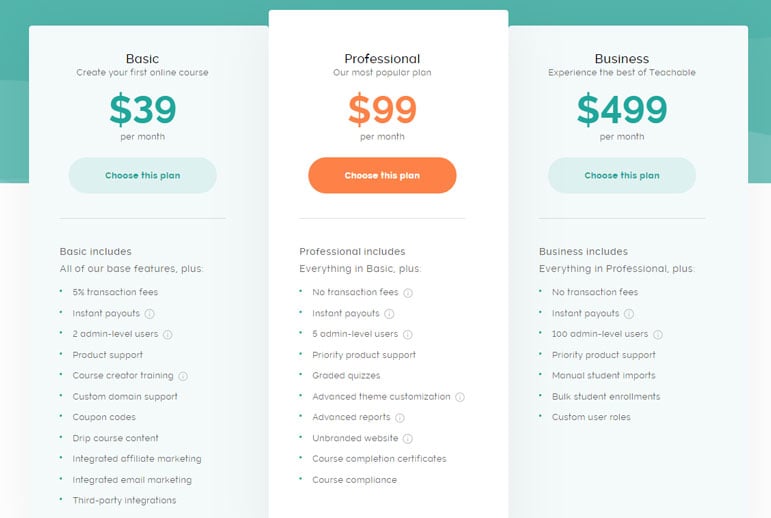
Teachable offers a free plan with limited features. Paid plans start at $39 per month. Its pricing tiers include Basic, Pro, and Business. These plans offer different limits on courses and students.
Value For Money
Kajabi includes many built-in marketing and automation tools. This can reduce the need for extra software. It suits creators who want an all-in-one platform.
Teachable’s lower cost suits creators who want a simple course platform. It offers good course-building tools but fewer extras. You may need other tools for marketing and automation.
Consider what features matter most. Kajabi may cost more but bundles many tools. Teachable is budget-friendly but may require additional services.
User Experience
User experience is key when choosing an online course platform. It affects how easily creators manage their content and students learn. Both Kajabi and Teachable offer distinct experiences that suit different needs.
Ease Of Use
Kajabi has a clean, modern interface. It organizes tools clearly, making navigation smooth. Beginners can quickly find what they need to build courses.
Teachable keeps things simple and straightforward. Its dashboard focuses on course creation and student management. Users spend less time learning the system and more time creating content.
Both platforms provide drag-and-drop features. Kajabi’s design tools are more advanced but might seem complex at first. Teachable’s simpler setup works well for those new to online teaching.
Customer Support
Kajabi offers 24/7 live chat and email support. Their team responds quickly to questions and problems. Users also get access to a large knowledge base and community forums.
Teachable provides email support and live chat during business hours. Their help center includes guides and tutorials. Response times can vary, but the support is helpful and friendly.
Both platforms care about user success. Kajabi’s round-the-clock support is great for urgent issues. Teachable’s resources assist users in solving common problems independently.
Payment And Monetization
Payment and monetization are key parts of any online course platform. They affect how you earn money and handle transactions. Choosing the right tools makes selling easier and more secure. Let’s explore how Kajabi and Teachable manage payments and pricing.
Payment Gateways
Kajabi uses Stripe and PayPal for processing payments. Both are safe and widely trusted. You can accept credit cards and digital wallets. Kajabi handles all the payment processing inside the platform. This means fewer steps to get paid.
Teachable also works with Stripe and PayPal. It allows you to pay out in multiple currencies. This helps if you have students worldwide. Teachable offers instant payouts for faster access to money. You can set up custom payout schedules, too.
Pricing Flexibility
Kajabi lets you create various pricing models. You can sell one-time payments, subscriptions, or payment plans. Bundles and coupons are easy to add. This flexibility helps attract different types of buyers.
Teachable supports one-time fees, subscriptions, and payment plans as well. It also allows free courses or previews. You can offer discounts with coupon codes. The platform gives you control over pricing strategy.
Integrations And Extensions
Integrations and extensions help online course platforms work well with other tools. They allow users to connect extra apps and services. This makes managing courses, marketing, and sales easier. Both Kajabi and Teachable offer options to extend their functions. Understanding these options can guide you in choosing the best platform.
Third-party Apps
Kajabi supports many popular third-party apps. It works smoothly with email marketing tools, payment gateways, and analytics services. Users can connect apps like Mailchimp, Stripe, and Google Analytics. This helps automate marketing and track sales data.
Teachable also integrates with several third-party apps. It links with tools such as ConvertKit, Zapier, and PayPal. These connections improve email campaigns and payment processing. Both platforms provide easy ways to add these apps.
Api Access
Kajabi offers API access for advanced users. This lets developers create custom integrations. Businesses can tailor the platform to fit specific needs. API access adds flexibility for tech-savvy users.
Teachable provides API access too. It allows users to build unique tools and connections. This helps with custom workflows and data management. API access on both platforms supports growth and innovation.
Credit: www.learnworlds.com
Performance And Reliability
Performance and reliability are key factors for any online course platform. They affect user experience and course delivery. Both Kajabi and Teachable offer solid options, but there are differences worth noting.
Site Speed
Site speed impacts how fast pages load for your users. Kajabi uses a global content delivery network. This helps load pages quickly around the world. Teachable also uses good technology to keep speed high. Both platforms deliver fast load times, which helps keep learners engaged.
Uptime
Uptime means the platform is available and working. Kajabi promises 99.9% uptime. They use reliable servers and backups to avoid downtime. Teachable also offers 99.9% uptime with strong server support. Both platforms ensure your courses stay online without interruptions.
Best Use Cases
Choosing the right platform depends on your needs and goals. Both Kajabi and Teachable serve different types of users. Knowing their best use cases helps you pick the right fit. This section highlights who benefits most from each platform.
Ideal Users For Kajabi
Kajabi suits entrepreneurs who want an all-in-one solution. It fits creators who need marketing tools and website building. Users who want to sell courses, memberships, and digital products in one place benefit here. Business owners seeking automation for email marketing and sales funnels find Kajabi useful. Those who prefer a ready-to-use platform with strong support enjoy Kajabi.
Ideal Users For Teachable
Teachable fits instructors focused mainly on course creation and sales. It works well for teachers who want a simple, easy-to-use platform. Creators who need flexible pricing and course customization prefer Teachable. Those who want to handle marketing separately or use other tools find this platform suitable. Teachable suits users who want to start quickly without complex setups.
Conclusion
Choosing between Kajabi and Teachable depends on your specific needs. Kajabi offers more marketing tools and automation. Teachable focuses mainly on course creation and ease of use. Both platforms support video hosting and student management. Consider your budget, goals, and technical skills before deciding.
Each platform has strengths that suit different types of creators. Take your time to explore their features and pricing. Your success depends on how well the platform matches your teaching style.
Affiliate Disclaimer

I would like to let my visitors know that I am a proud affiliate partner of Kajabi. This means some of the links on this page may be affiliate links, and if you decide to sign up or purchase through them, I may earn a commission.

This commission helps support my work, content creation, and ongoing reviews—at no additional cost to you. You will always pay the same price, whether you use my link or go directly to Kajabi.